How to play guide
Arma 3 Beginner's Guide: Essential Keys, Bootcamp and First Missions
New to Arma 3? Default keys, Bootcamp and Showcase missions, zeroing, cover and stances, commanding your squad and what to know before jumping into multiplayer.
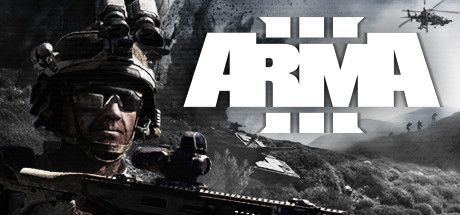
Arma 3 is a military simulation game from Czech studio Bohemia Interactive, released on 12 September 2013. It looks like a shooter, but it plays very differently: a single round can take you out, you may walk for kilometres, and in a helicopter you start the engine yourself. According to its Steam page, the terrains add up to more than 610 square kilometres: the Mediterranean islands of Altis, Stratis and Malden, the South Pacific jungles of Tanoa and the temperate woodland of Livonia.
This guide is for players who just bought the game and feel overwhelmed by the sheer number of keys. We cover where to start, what the essential keys do, how to move between singleplayer and multiplayer content, and the traps new players fall into most often.
Keys follow the default layout (Arma 3 Apex preset) listed on the Bohemia Interactive Community wiki and the game's Field Manual pages. They can all be rebound in the options menu.
Goal of the game
Arma 3 has no single goal; it is a military sandbox, a game that hands you tools and systems and lets you decide what to do with them. You can play the East Wind story campaign alone, team up with friends for Apex Protocol from the Apex expansion, follow humanity's encounter with an alien presence in First Contact from the Contact expansion, or build your own scenario in the Eden Editor.
The core loop: read the briefing, pick your loadout, and approach your objective while accounting for terrain, distance and visibility. Firefights often start hundreds of metres away, and with realistic ballistics, zeroing, stance and cover matter as much as aim. In multiplayer, the official modes listed on Steam are Combat Patrol, Escape and Warlords, alongside countless community game modes and long-standing milsim units that run organised operations.
Controls
| Key | Action |
|---|---|
| W A S D | Move; turn with the mouse |
| X / Z | Crouch and go prone; press again to stand up |
| Left Shift | Sprint; increases fatigue |
| C | Toggle combat pace (weapon shouldered, slower movement) |
| Q / E | Lean left / right; double-tap to lock the lean |
| Left Ctrl + W A S D | Adjust stance: rise or lower slightly, half-step sideways |
| Left Alt | Hold for free look; double-tap to toggle |
| Left click / Right click | Fire / optics |
| R | Reload |
| F | Switch fire mode or next weapon |
| G | Throw a grenade or other throwable |
| Page Up / Page Down | Zeroing up / down |
| I / M | Inventory / map |
| Space / Mouse wheel | Default action (e.g. get in a vehicle) / scroll the action menu |
| V | Step over low obstacles; get out of a vehicle, double-tap to eject |
First steps
- Start with BootcampThe official Arma 3 site highlights Bootcamp as the tutorial content for newcomers. It teaches movement, stances, aiming and basic weapon handling without pressure. Going through it first makes your first week far easier than jumping straight into multiplayer.
- Look over the controls onceThe controls section of the options menu shows the default layout and lets you rebind keys. Get comfortable with the basics above first; learn vehicle and command keys when you need them. There is no point memorising everything on day one.
- Discover the action menuMuch of Arma 3 runs through the action menu opened with the mouse wheel: entering vehicles, switching seats, taking ammo. Scroll to an option and press the middle mouse button or Space. If you cannot do something, check this menu first.
- Get to know gear in Virtual ArsenalThe Virtual Arsenal and Garage listed on the Steam page let you inspect gear and vehicles with no mission pressure. Try different optics, vests and backpacks and see how weight affects your movement.
- Play the Showcase missionsThe short Showcase missions each focus on a single topic such as infantry, vehicles or helicopters. They introduce one skill at a time and are a quick way to find out which playstyle you enjoy.
- Learn zeroingWhen aiming at distant targets you will see rounds drop. Using Page Up and Page Down to set your optic's zeroing close to the target distance noticeably improves accuracy. Estimating range with binoculars (B) first is a good habit.
- Move on to East WindOnce the basics feel natural, the singleplayer East Wind campaign lets you use what you learned in a real mission flow on Stratis and Altis. You can save and retry, so mistakes are cheap.
- Enter multiplayer through simpler modesWhen you feel ready, start with shorter official modes like Combat Patrol or Escape. The default push-to-talk key is Caps Lock and text chat is on the / key. Before joining a serious community unit, read their rules and required mods.
Tips and tactics
- Get down, then lookWhen you come under fire, go prone with Z or crouch with X right away. You become harder to spot and your aim steadies. Sprinting upright across open ground usually ends badly in Arma.
- Combine leaning with coverQ and E let you peek around corners while keeping most of your body hidden. Left Ctrl with W or S raises or lowers your stance to match the cover height, ideal for firing over a low wall.
- Manage fatigueThe Field Manual notes that sprinting increases fatigue, and a tired soldier's aim sways. Cover long distances at a steady pace rather than sprinting, and catch your breath before contact.
- Make free look a habitHold Left Alt to turn your head while walking, so you can scan around without changing direction. It is just as useful when driving.
- Open the map oftenThe map (M) is your main way to see objectives and teammates. Compass (K) and watch (O) give you direction and time at a glance.
- Remember night visionOn night missions, toggle night vision goggles with N if you have them. Without the item in your inventory the key does nothing, so check your gear before heading out.
- Pick the right seatGet in with Space or through the action menu. Driver, gunner and commander seats do different jobs, and you can switch seats from the action menu. In a helicopter, Left Shift starts the engine, holding it climbs, and Z descends.
- Command your squadAs a leader, the ~ key opens the quick command menu with the whole squad selected; F2-F10 select individual soldiers. Point at a spot and press Space to send selected units there. Number keys open command categories such as move, target and formation.
- Use third person when allowedIf the server or scenario allows it, Enter on the numeric keypad switches between first and third person. It is especially handy when driving.
- Use the Workshop with careThe Steam page lists more than 160,000 user-made items on the Workshop. Subscribe to the mods a server requires through the Workshop, and keep unneeded mods disabled to speed up launch and avoid conflicts.
Common mistakes
- Jumping straight into multiplayer on day one; a player who does not know the basic keys struggles and drags the team down. Do Bootcamp and the Showcases first.
- Sprinting upright across open ground; with realistic ballistics you are easy to spot from afar, so move from cover to cover crouched.
- Never adjusting zeroing; at long range rounds drop, and you miss even with the crosshair on target.
- Overloading your inventory; heavy loads slow you down and tire your character quickly.
- Not knowing the action menu; entering vehicles, switching seats and much more happen there, and players who miss it think the game is broken.
- Ignoring community server rules; serious operation servers expect roles, radio discipline and chain of command.
Frequently asked questions
Is Arma 3 available in Turkish?
Can I play solo?
Is it hard for newcomers?
Does it support mods?
Do I need the expansions?
What is Zeus?
This guide was written for version: This guide reflects the current version of Arma 3 and the default PC keybindings (Arma 3 Apex preset) as of September 2026; all keys can be rebound.

Yudum World
A village at the foot of Mount Kaf.
Create your character, stroll the square and meet people face to face. In your browser, free.
- 🧑 Create your character
- 🎲 Play a round at the coffeehouse
- 🏠 Build a home with your group
 Yudum WorldA village at the foot of Mount Kaf is waiting for you.Join free →