How to play guide
Heroes of Might & Magic III HD Beginner's Guide: Towns, Heroes, Resources and the Weekly Cycle
A starter guide to Heroes III HD Edition: town build order, heroes and armies, the seven resources, weekly creature growth, the combat screen, hotkeys and common mistakes.
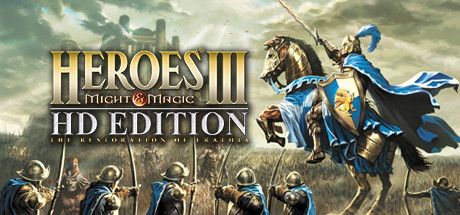
Heroes of Might & Magic III is the 1999 turn-based strategy classic. As the note on its Steam page makes clear, the HD Edition is based on the original release, The Restoration of Erathia: graphics are updated for high resolutions and widescreen, but the towns and maps from the expansions are not included.
This guide is for players opening it for the first time or returning after years and forgetting the rhythm. It covers growing your town, building your army and what to watch on the combat screen.
Below you will find the core loop, hotkeys, first steps, tips, common mistakes and FAQs.
Goal of the game
The game has two screens. On the adventure map you move heroes, capture mines and structures, collect treasure and meet enemy heroes. On the town screen you build, recruit creatures and hire heroes. Each hero has limited movement per day; when you end your turn, the opponent moves.
The core loop is weekly: according to the community wiki, town dwellings produce new creatures on the first day of every week. You gather resources, build, grow your army at the start of the week and take a stronger force into the field. Most scenarios are won by defeating opponents or taking their towns, but some maps have special victory conditions listed in the scenario info.
Controls
| Key | Action |
|---|---|
| Left click | Select; set a hero's destination (click again to move) |
| Right click (hold) | Show info on an object, creature or hero |
| E | End turn |
| H | Next hero |
| T | Next town |
| C | Cast spell (map) / open spellbook (combat) |
| D | Dig (map) / defend (combat) |
| Z / W | Sleep / wake hero |
| K | Kingdom Overview |
| Q | Quest Log |
| V · P | View World · Puzzle Map |
| U | Toggle underground / surface |
| S · L | Save · Load |
| W (combat) | Wait: move the creature to the end of the round |
| A (combat) | Auto combat |
First steps
- Start with an easy scenarioThe Steam page lists seven campaign scenarios and around 50 skirmish maps. For a first game, a small skirmish map against one opponent on easy teaches more than the campaign.
- Know your townThis edition has eight town types: Castle, Rampart, Tower, Inferno, Necropolis, Dungeon, Stronghold and Fortress. Each has different creatures and magic leanings. Castle or Rampart are easy to read for a first game.
- One building per dayYou can build one structure per day in each town. Balance income buildings (Town Hall and up) with creature dwellings early on. No dwelling means no weekly growth, and no income means no buildings later.
- Capture minesThere are seven resources: gold, wood, ore, mercury, sulfur, crystal and gems. Walk a hero onto a mine to flag it and it produces every day. Wood and ore are needed for almost everything, so grab them first.
- Hire a second heroNew heroes come from the Tavern. Letting a second hero gather nearby piles and mines while your main hero pushes with the army makes each week far more efficient.
- Recruit at the start of the weekCreatures accumulate in dwellings on day one of each week. Buy them and transfer them to your main hero. Town dwellings keep accumulating, but the wiki notes that external dwellings on the map are capped.
- Clear neutrals selectivelyNeutral creature stacks block paths. Hold right click to get a sense of their size. Clear easy ones for experience and route around huge ones.
- Choose skills on level-upEach level-up offers a choice between two skills. Skills that speed up movement and economy make a big difference early; magic schools should match your town's spell leanings.
Tips and tactics
- Right click explains everythingUnsure about a structure, item or creature? Hold right click. The game shows what it does, who owns it or roughly how large it is. Look before you walk in.
- Don't waste movementHeroes travel a limited distance per day. Plan the route and use a gatherer hero instead of walking your main hero back and forth. Put finished heroes to sleep with Z so they drop out of the H cycle.
- Use WaitIn combat, W moves a creature's turn to the end of the round. Letting the enemy approach first can give your slower units the first strike.
- Protect your shootersRanged creatures suffer when enemies stand next to them. Screen them with melee units and target the enemy's shooters first.
- Defend with purposeDefend (D or Space) boosts toughness for that round. It helps when you have no good move or want the enemy to come to you, but an army that defends every turn gains nothing.
- Auto combat for easy fights onlyA hands the fight to the AI. It saves time against weak neutrals, but in close fights the AI can lose units needlessly, so handle important battles yourself.
- Visit obelisksObelisks reveal pieces of the Puzzle Map (P). Once enough is revealed you can find where the Grail is buried and dig with D. The Grail building also boosts creature growth.
- Retreating beats losingThe combat screen offers Retreat (R) and Surrender (S). Saving your hero from a hopeless fight lets you rehire them from the Tavern; the army is lost but the hero's experience is not wasted.
- Check the undergroundSome maps have an underground layer, toggled with U. Mines and enemy towns can be down there, so look at both levels early.
- Hot-seat and onlineThe Steam page lists local multiplayer (taking turns on one PC), an online lobby and a map editor. Hot-seat with a friend is one of the game's oldest pleasures.
Common mistakes
- Expecting expansion content: the HD Edition is based only on The Restoration of Erathia; no Conflux town or expansion campaigns.
- Delaying income buildings: a town without gold income stalls within weeks.
- Playing with a single hero: collecting everything with the main hero wastes movement that should push the army forward.
- Forgetting to recruit at the start of the week: your main hero marches on with a thin army.
- Auto-resolving every fight: the AI can take needless losses in close battles.
- Leaving towns empty: an undefended town or a far-away main hero can cost you a town to a single quick enemy move.
Frequently asked questions
Is Heroes III HD Edition in Turkish?
Does the HD Edition include the expansions?
Can I play solo?
Which town should I start with?
When do creatures replenish?
Which platform is it on?
This guide was written for version: Guide written in September 2026 for the HD Edition on Steam. Hotkeys come from the heroes.thelazy.net wiki, limited to those present in the original game; keys added by community patches (HD Mod, Horn of the Abyss) are excluded.



Yudum World
A village at the foot of Mount Kaf.
Create your character, stroll the square and meet people face to face. In your browser, free.
- 🧑 Create your character
- 🎲 Play a round at the coffeehouse
- 🏠 Build a home with your group
 Yudum WorldA village at the foot of Mount Kaf is waiting for you.Join free →