How to play guide
Team Fortress 2 Beginner's Guide: Nine Classes, Game Modes and Teamwork
A starter guide to Team Fortress 2: what each of the nine classes does, how Payload and Control Point work, default PC keys, playing with Medics and Engineers, and common mistakes.
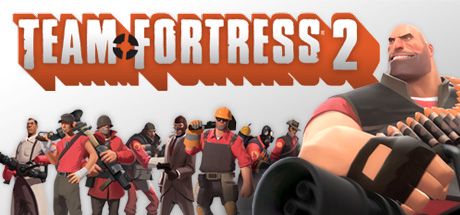
Team Fortress 2 is Valve's team-based shooter, released in The Orange Box in 2007 and free to play since 2011. Two teams, RED and BLU, each pick from nine classes and compete for an objective on a map. Years later its servers are still busy, and the cartoon style keeps it from looking its age.
The hard part of TF2 is not aiming but how the classes complement each other. A Heavy with a Medic behind him does more than three players wandering alone. This guide walks new players through the classes, the modes and what to learn in the first hours.
The interface supports many languages, including Turkish; full audio is English only.
Goal of the game
Every map has a goal. In Payload, the attacking team pushes a bomb cart through checkpoints into the enemy base while defenders try to stop it before time runs out. In Control Point, teams capture and hold points across the map; in King of the Hill, the team that holds the single central point for a total of three minutes wins. In Capture the Flag, you carry the enemy's Intelligence briefcase back to your base. There are also Payload Race, Arena, Special Delivery, Mannpower, PASS Time and the co-operative Mann vs. Machine, where a team fends off waves of robots.
The official Team Fortress 2 wiki splits the nine classes into three groups. Offense: the very fast Scout, who captures points twice as fast as anyone else, the rocket-launching Soldier and the flamethrower-wielding Pyro. Defense: the Demoman, who holds areas with stickybombs, the slow Heavy with the highest health (300), and the Engineer, who builds Sentry Guns, Dispensers and Teleporters. Support: the Medic, who heals teammates and grants brief invulnerability with a full ÜberCharge, the Sniper, who picks off key targets from range, and the Spy, who disguises, cloaks and slips behind enemy lines.
Controls
| Key | Action |
|---|---|
| W A S D | Move |
| Space / Ctrl | Jump / crouch |
| Left click / Right click | Primary fire / secondary function (e.g. Medic's ÜberCharge, spinning up the Heavy's minigun) |
| Middle mouse button | Special attack (on some items) |
| R | Reload |
| 1-9, 0 / Q | Loadout slots / last item used |
| E | Call for a Medic |
| Z / X / C | Voice menus 1-2-3 (e.g. "Go!", "Spy!", "Sentry ahead!") |
| , (comma) | Change class |
| . (period) | Change team |
| M / N | Character loadout / backpack |
| G / F | Taunt / inspect target or item |
| L | Drop the Intelligence |
| Tab | Scoreboard |
| Y / U / V | Chat to all / team chat / voice chat |
First steps
- Start with Training and Offline PracticeThe Training section in the main menu introduces the basic classes. Offline Practice lets you explore maps and try classes against bots with adjustable difficulty; dying there costs nobody anything.
- Begin with Casual matchesCasual matchmaking drops you into regular games without ranking pressure. Move on to Competitive once you know the classes and maps a little.
- Try Soldier, Heavy or Medic firstSoldier's rockets deal splash damage and teach movement through rocket jumping. Heavy's large health pool forgives mistakes. Medic contributes hugely even with little aiming skill; look at a teammate and hold left click.
- Read the map's objectiveThe start screen and the top of the HUD show which point or cart matters. On Payload offense, standing next to the cart pushes it, and more players nearby push it faster, up to a limit.
- Learn where health and ammo packs areSmall, medium and large health and ammo packs sit in fixed places and respawn some time after being taken. Knowing where to fall back after a fight keeps you alive longer.
- Get into the habit of pressing EPressing E when hurt shows Medics where you are. When you play Medic, these calls tell you who needs help.
- Use the Z-X-C voice commandsEven without a microphone, the voice menus let you shout "Spy!", "Go!" or "Thanks!". A Spy warning in particular saves teammates.
- Play every class for a few matchesThe best way to learn a class's strengths and weaknesses is to play it. Someone who never played Spy struggles to spot a disguised one; someone who never played Engineer does not know a Sentry's range.
Tips and tactics
- Protect your Medic and target theirsAccording to the official wiki, the Medic's ÜberCharge grants brief invulnerability and can break a defence in one push. Protecting your Medic and bringing down theirs is one of the things that decides a match.
- Do not waste ÜberChargeAs Medic, do not pop it the moment it is full; use it when your team is ready to push and there is a Sentry or a crowd in front of your patient. A full charge is lost when you die.
- Spy-checkIf a teammate acts oddly, approaching from behind or rubbing along walls, shoot them once. A Pyro's flames are especially good at revealing cloaked or disguised Spies.
- Build your Engineer nest out of sightPut the Sentry Gun behind a corner where enemies cannot see it from range, with a Dispenser beside it to give you and your team health and ammo. A Sentry in the open is easy prey for Snipers and Demomen.
- Do not forget the TeleporterOn both attack and defence, a Teleporter greatly shortens the trip to the front line. As Engineer, place the entrance near spawn and the exit at a safe forward spot.
- Chase points with ScoutThe official wiki says Scouts capture points twice as fast as other classes. Running to an empty point while the teams fight elsewhere can win the round.
- Learn the Pyro's airblastThe Pyro's compression blast puts out burning teammates and reflects incoming rockets and grenades. Only spraying flames uses half of the class.
- Trap corners with the DemomanLay stickybombs at a point's entrance or the corner the cart must pass, and detonate them as enemies arrive. The wiki defines the Demoman's defensive role around exactly this kind of area denial.
- Do not roam alone as HeavyThe Heavy is slow and a big target. With a Medic he is very strong; alone in the open he is easy work for Snipers.
- Pick the class your team is missingCheck your team's classes with Tab. Joining a team of five Snipers as a Medic or Engineer does much more than a sixth Sniper. Switch classes in the spawn room with the comma key.
Common mistakes
- Ignoring the objective to chase kills: if no one pushes the cart or stands on the point, the team loses even if you top the scoreboard.
- Leaving the Medic alone: taking heals without positioning to protect the Medic quickly costs the team its most valuable player.
- Refusing to switch when the team is stacked on one class: a lopsided lineup is helpless against a single Sentry or a Medic-Heavy pair.
- Never suspecting disguised Spies: a single backstab takes down most classes instantly.
- Building Sentries in the open: a Sentry visible from range is destroyed by grenades or rockets before enemies even come close.
- Not learning where health packs are: walking into the next fight on half health means needless deaths.
Frequently asked questions
Is Team Fortress 2 free?
Does it support Turkish?
Can I play alone?
Which class should I start with?
Which systems does it run on?
Can I use a controller?
This guide was written for version: This guide reflects the live version as of September 2026. Keys are the defaults and can be changed under Options → Keyboard.


Yudum World
A village at the foot of Mount Kaf.
Create your character, stroll the square and meet people face to face. In your browser, free.
- 🧑 Create your character
- 🎲 Play a round at the coffeehouse
- 🏠 Build a home with your group
 Yudum WorldA village at the foot of Mount Kaf is waiting for you.Join free →