How to play guide
Raft Beginner's Guide: The Hook, Fresh Water, Handling the Shark and Starting the Story
A Raft starter guide: gathering with the plastic hook, purifying seawater, your first grill and nets, keeping the shark away, starting the story with a receiver and antennas, controls and common mistakes.
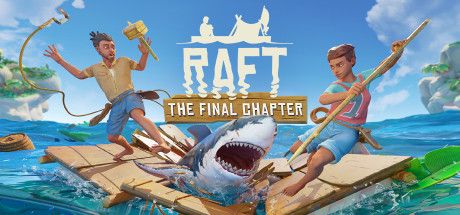
Raft is Redbeet Interactive's ocean survival game. You wake up on a tiny raft of a few planks with a plastic hook in your hand. Around you is endless water, and in it a shark that keeps circling to chew on your raft's edges. By gathering floating barrels, planks and plastic, you grow your raft into a floating home.
This guide is for players who die of thirst or to the shark in their first minutes and don't know what to craft first. The game explains almost nothing at the start, but once the priorities click, progress speeds up a lot.
Below you'll find the goal of the game, the default PC controls, what to do in your first hours, concrete tips, common mistakes and answers to frequently asked questions.
Goal of the game
Your first goal in Raft is to survive: hunger and thirst meters keep dropping, and the shark damages both your raft and you when you're in the water. So you gather materials with your hook, purify seawater, fish and cook. Expanding your raft, reinforcing it against the shark and crafting new tools make up the main loop of the early hours.
Once survival is under control, the story begins. According to the community wiki, placing a Receiver and three antennas on your raft lets you pick up radio signals, and four-digit codes you find lead you from one story island to the next. The first stop is a radio tower, and the trail runs all the way to a legendary place called Utopia. Along the way you land on islands, dive, and discover new materials and recipes.
Controls
| Key | Action |
|---|---|
| W A S D | Move |
| Left Shift | Sprint |
| Left Ctrl | Crouch; swim down |
| Space | Jump; swim up |
| Left click | Action 1: throw hook (hold and release), attack, place |
| Right click | Action 2: hammer build menu, reel hook back |
| E | Interact: pick up, drink, open chests |
| Tab or I | Inventory and crafting menu |
| R | Rotate piece being placed |
| X | Remove a placed piece |
| Q | Drop item |
| T | Show/hide notebook (codes and notes) |
| , (comma) | Third-person camera |
| Enter | Chat |
| 1-0 or mouse wheel | Select hotbar item |
First steps
- Choose your game modeAccording to the community wiki, the game mode can't be changed later. Peaceful has no aggressive enemies and slower hunger and thirst. Normal is the core balance; on Hard, thirst drains about 1.5 times faster. Normal or Easy is a good choice for a first run.
- Hook everythingYou start with a plastic hook. Hold and release left click to throw it into the sea and reel in floating planks, plastic, palm leaves and barrels. Barrels give several materials and sometimes food, so don't let them drift by.
- Make a cup and a simple purifierThirst will kill you before hunger. The wiki lists the Empty Cup at 4 plastic and the Simple Purifier at 6 planks, 6 palm leaves and 4 plastic. Fill the cup with seawater and put it in the plank-fuelled purifier; after about 30 seconds it's fresh water.
- Build a simple grillFor hunger, build a Simple Grill; the wiki lists 6 planks, 1 scrap and 3 rope, and it burns planks as fuel. Raw food fills you less, and raw fish and meat can make you thirstier, so cook whenever you can.
- Fish with a rodCraft a fishing rod and cast from the edge of your raft. Fish are a steady food source, more reliable than whatever food drifts past your hook. Keep the grill running in the first days.
- Expand with the hammerThe Building Hammer takes 4 planks and 2 rope. With the hammer in hand, right click opens the build menu so you can add foundations and repair damaged pieces. As your raft grows you make room for a grill, purifier and storage.
- Place collection netsA Simple Collection Net goes on the edge of your raft and automatically catches floating materials that pass by. The wiki says a net holds up to 10 items; once it's full, new items float past, so empty nets often.
- Build a research tableThe Research Table takes 14 planks and 2 scrap. Place new materials in it and research them to unlock new recipes. Make a habit of researching every new material you bring back from islands and dives.
Tips and tactics
- The shark comes on a scheduleAccording to the wiki, the shark attacks your raft about every five minutes and chews on foundations. When it starts, hit it with your spear or another tool; once hurt it swims off for a while. Repair the damaged piece with your hammer.
- Four bites and you're doneThe wiki says a shark bite deals 30 damage, so four bites kill a player at full health. Check where the shark is before diving in; hitting its nose just as it opens its mouth makes it turn away and buys you time.
- Shark bait buys timeAccording to the wiki, shark bait thrown into the water keeps the shark busy for about 80 seconds. Throwing bait away from your raft is the safest way to explore an island or dive.
- Armour the edgesThe shark won't attack foundations and collection nets fitted with Foundation Armor. Once you can research and craft it, armour the outermost pieces first; your repair work drops dramatically.
- Eat when hungry, drink when thirstyRaft uses a craving system: the wiki explains that the emptier a meter is, the more effective food and drink are. Save valuable recipe dishes for when the meter is fairly low. The wiki also notes raw foods have no effect at all once the meter is 70 percent full.
- Anchor before exploringYour raft drifts constantly. Drop an anchor when you reach an island or a wreck, or it'll float away while you explore. Islands are the best source of sand, clay, ore and seeds.
- Place the receiver correctlyAccording to the wiki, the receiver must be at least one floor above foundation level, all three antennas on the same floor or half a level above or below, and each at least two foundations away from the receiver. The receiver drains batteries, so switch it off when done.
- Use your notebookThe notebook, opened with T, stores the notes and four-digit codes you find. Before leaving a story island, check whether you picked up a new code; you enter it into the receiver to find the next destination.
- Seagulls go for cropsThe wiki notes that outside Peaceful mode, seagulls attack your crops. When you start farming, research the scarecrow and place it next to your planters.
- You never have enough planks and plasticEverything starts with planks and plastic: fuel, tools, nets, foundations. Keep the hook and nets working constantly, and keep a separate chest of planks for fuel so your grill and purifier never go out.
Common mistakes
- Building before sorting out water: on Normal the wiki says thirst empties completely in about 15 minutes, so the purifier should be one of your first crafts.
- Putting collection nets on the outer edge: unarmoured outer pieces are the shark's target and nets are easily lost.
- Going ashore without anchoring: the raft drifts away and swimming back through shark water is risky.
- Eating raw fish and meat: it fills you less and makes you thirstier.
- Turning on the receiver before the antennas are set up properly: if placement rules aren't met, no signals show.
- Sticking with the plastic hook: it wears out; the wiki lists 40 uses, and upgrading to the scrap hook speeds things up.
Frequently asked questions
Is Raft available in Turkish?
Can I play alone?
Does the game have an ending?
Can I change the game mode later?
Can I kill the shark?
This guide was written for version: This guide reflects the current version (post-1.0) as of September 2026. Keys are the default PC bindings and can be changed in settings. Numbers come from the community wiki and vary with game mode multipliers.




Yudum World
A village at the foot of Mount Kaf.
Create your character, stroll the square and meet people face to face. In your browser, free.
- 🧑 Create your character
- 🎲 Play a round at the coffeehouse
- 🏠 Build a home with your group
 Yudum WorldA village at the foot of Mount Kaf is waiting for you.Join free →