How to play guide
Subnautica Beginner's Guide: Day One, Oxygen, Scanning and Your First Base
A starter guide to Subnautica: game modes, default PC keys, a step-by-step path from the lifepod to your first base, unlocking blueprints with the Scanner, oxygen, food and water, and common mistakes.
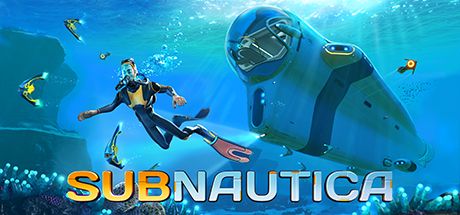
Subnautica is an underwater survival and exploration game from Unknown Worlds Entertainment, fully released in 2018. The starship Aurora crashes on 4546B, a planet covered in ocean, and you are the only one who makes it out in a lifepod. You have almost nothing, and around you is a sea that starts shallow and colourful and turns dark and dangerous as it deepens.
The game barely guides you. That is its greatest charm and also why new players get stuck early: wandering without knowing where things are, which tool you need first or why your oxygen runs out so fast can be frustrating. This guide maps out the first hours without spoiling the story.
The game supports many languages, including Turkish interface and subtitles.
Goal of the game
In Survival mode you manage health, oxygen, food and water. Oxygen drops underwater and refills at the surface or inside bases and vehicles. When food or water run out, your health slowly falls. According to the community wiki, dying costs you some of the items in your inventory; entering your lifepod, a base or a Cyclops "secures" your inventory.
The core loop: gather raw materials, craft tools and components at the Fabricator, scan wreckage fragments with the Scanner to unlock blueprints, and build gear and vehicles that let you go deeper. Meanwhile, signals and logs on your PDA draw you toward the planet's secrets. There are several modes: Survival, Freedom without food and water, single-life Hardcore, and Creative with unlimited materials. The wiki notes that you choose the mode when creating a save and cannot change it later.
Controls
| Key | Action |
|---|---|
| W A S D | Move / swim |
| Space / C | Swim up (jump on land) / swim down |
| Left Shift | Sprint |
| Tab | PDA: inventory, blueprints, databank, signals |
| Left click | Use held item / interact |
| Right click | Held tool's secondary function |
| 1-5 | Quick slots |
| Mouse wheel | Next / previous item |
| E | Exit / holster; rotate right while placing |
| Q | Deconstruct (with the Habitat Builder); rotate left while placing |
| R | Reload battery |
| F | Load an object into the Propulsion Cannon |
| F11 | Take a picture |
| Alt + Enter | Windowed / fullscreen |
First steps
- Get to know the Fabricator in your lifepodThe Fabricator inside Lifepod 5 is your first crafting station. The pod also has a storage locker and a medical kit dispenser. Its damaged systems are repaired later with the Repair Tool, which brings the radio back and with it new signals.
- Gather in the Safe ShallowsThe area around the pod is the safest in the game. Break Limestone Outcrops for Titanium and Copper, check other rock outcrops for more ores, and pick up Quartz and Acid Mushrooms from the seabed. Catch fish while you are at it.
- Build a Scanner firstAccording to the community wiki, the Scanner costs two Titanium and one Battery. It is the only way to scan fragments and unlock blueprints, so it is the key to progress. Scanning creatures adds databank entries that tell you which ones are dangerous.
- Add a Survival Knife and FlashlightThe Survival Knife needs one Titanium and one Silicone Rubber, made from Creepvine Seed Clusters found in the Kelp Forest. You need the knife to take plant samples. The Flashlight (one Battery, one Glass) is essential in dark caves.
- Sort out food and waterCook the fish you catch at the Fabricator. Some fish, such as the Bladderfish, can be turned into filtered water. Watch your hunger and thirst bars and keep spares in the pod's locker.
- Scan Seaglide fragmentsThe Seaglide is a handheld underwater propeller; the wiki says scanning two of its fragments, found in wrecks in the Safe Shallows and Kelp Forest, unlocks the blueprint. It greatly boosts your speed and your exploration range.
- Prepare for the Aurora explosionEarly on, your PDA warns that the wreck is dangerous. According to the wiki, the Aurora's drive core explodes a few days in and floods the area with radiation. The Radiation Suit blueprint unlocks automatically afterwards; do not stay in irradiated areas without it.
- Build your first base with the Habitat BuilderThe Habitat Builder takes an Advanced Wiring Kit and a Battery. The Advanced Wiring Kit needs a Wiring Kit, two Gold and a Computer Chip. A shallow spot with easy surface access and good sunlight makes a first base much easier.
- Move on to vehiclesOnce you unlock the Mobile Vehicle Bay by scanning its fragments, you can build vehicles such as the Seamoth. The wiki lists the Seamoth's crush depth as 200 metres without modules, rising with depth modules. Vehicles give you both speed and oxygen.
Tips and tactics
- Budget oxygen for the way backGetting back to the surface takes as long as going down. Start heading back when your oxygen is at half; losing the exit inside caves and wrecks is the most common way to die.
- Drop BeaconsA Beacon broadcasts its position and can be renamed. Placing one at your pod, an interesting wreck or a deep cave entrance helps you navigate an ocean with no compass.
- Use the Aurora as a landmarkAccording to the wiki, the Aurora sits on the far eastern edge of the map and is visible from the surface nearly everywhere. When lost, surface and orient yourself by the ship.
- Scan every fragment, even known onesThe community wiki notes that scanning a fragment whose blueprint you already have gives you two Titanium. Even redundant scans are worth something.
- Scan creatures before getting closeScanning a creature records its behaviour and threat level in the databank. Approaching large creatures without knowing if they are aggressive is needless risk.
- Keep an eye on batteriesThe Scanner, Flashlight and Seaglide run on batteries; swap in a fresh one with R when they run dry. A Battery needs Acid Mushrooms and Copper, so always carry a few spares.
- Save Power Cells for vehiclesThe wiki says a Power Cell is made from two Batteries and one Silicone Rubber and powers vehicles. Preparing spare Power Cells before building a Seamoth keeps you from getting stranded on long trips.
- Secure your inventoryStop at your pod or base before a valuable expedition to reduce what you can lose. According to the wiki, when you die you keep your last secured inventory plus only one random item picked up after that.
- Respect depth limitsVehicles and base parts can only withstand so much depth. Take a Seamoth below its limit and the hull starts taking damage; do not go deeper without a depth module.
- Be careful on night divesThe sea gets very dark at night. Flashlights and vehicle lights help you see, but some creatures react to light and movement; keep long night trips close to base.
Common mistakes
- Exploring until oxygen drops below half: the way back takes as long as the dive, and losing a cave exit ends in death.
- Wandering without a Scanner: without scanning fragments no blueprints unlock and progress stalls completely.
- Approaching the Aurora before it explodes, or entering after the explosion without a Radiation Suit: radiation deals constant damage.
- Not dropping Beacons: without a compass or map, finding your pod or a wreck again can take hours.
- Not carrying spare batteries: if your Seaglide or Flashlight dies at depth, you lose speed or sight instantly.
- Setting out on a long trip without securing your inventory: if you die you can lose most of what you gathered.
Frequently asked questions
Is Subnautica multiplayer?
Which mode should I pick?
Can I change the mode later?
Does it support Turkish?
Can I play with a controller or in VR?
Which systems does it run on?
This guide was written for version: This guide reflects the live version as of September 2026. Keys are the default QWERTY layout and can be rebound. Recipes are for the original Subnautica; Below Zero and Subnautica 2 differ.




Yudum World
A village at the foot of Mount Kaf.
Create your character, stroll the square and meet people face to face. In your browser, free.
- 🧑 Create your character
- 🎲 Play a round at the coffeehouse
- 🏠 Build a home with your group
 Yudum WorldA village at the foot of Mount Kaf is waiting for you.Join free →